Streamlined three-tier loyalty program where every member enjoys the same high-quality rewards, with benefits escalating at each tier.
Simple yet effective, this program stands as the best deal for Eloking's boosting services, ensuring maximum value and satisfaction for all our users.
Cashback on all Eloking boosts (3%, 5%, 7%)
Discounts for all Eloking boosts (5%, 10%, 15%)
Discount for a friend 🤗
Free daily lootbox spin with industry-leading rewards
Member exclusive season and event offers
How does crossplay work in Overwatch 2?
h
Hamza Rashid
Gamer
03 Feb 2026
Updated On
The gaming world is smaller than ever because of companies finally working together. What started with Fortnite letting PC and console players play alongside each other has transformed into the industry-wide feature known as crossplay that multiple games have implemented, including Overwatch 2.
Crossplay in Overwatch 2 works a little differently because of the game’s competitive nature. While players from any platform can play alongside each other, the feature is limited to certain game modes and cannot be used to its full capacity for those looking to climb the ranks with their friends.
Here’s everything to know about crossplay in Overwatch 2, including how it works and how you can disable it. If you don’t have talented friends who can play the game alongside you, you can always hire a professional booster from Eloking to show you the ropes while helping you climb the ranks like never before.
What is Overwatch 2 crossplay?
Crossplay is a feature in Overwatch 2 that allows players across all platforms to come together and play online. It means that players on PC, Xbox, PlayStation, and Nintendo Switch can group up. Crossplay is enabled for most game modes, including quick play. In competitive mode, players are split into two pools depending on input method.
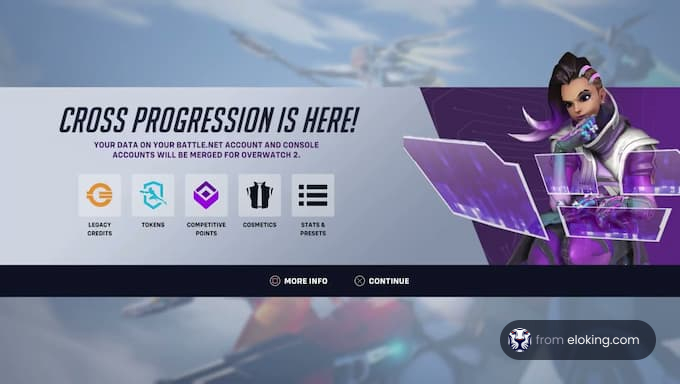
Overwatch 2 supports cross-progression, which means a player’s progress, including skins, achievements, and other cosmetics, is stored on their Battle.net account and synchronized across all platforms.
Struggling to win? Bad teammates?
Purchase a game with one of our PRO players.
One game
Average wait time <30 minutes
$4.00
$3.32 per game
Two games
Average wait time <30 minutes
$8.00
$3.00 per game
Three games
Average wait time <30 minutes
$12.00
$2.50 per game
How do you set up Overwatch 2 crossplay?
To set up cross-platform play, players must ensure their console account is linked to their Battle.net account. Here are the steps:
Sign up for a Battle.net account if the player doesn’t have one. Log in if they have one.
Click on the account’s name in the top-right corner of the Battle.net website [1].
Open the dropdown menu and select account settings.
Go to connections, where players will see options to connect their Battle.net account to Xbox Live, PlayStation Network, or a Nintendo account.
After linking the accounts on the website, players must merge them with their console Overwatch 2 account:
Log in to Overwatch 2 on a console.
The welcome screen will have a code and a QR code.
Either scan the QR code using a smartphone or open blizzard.com/link on a browser.
The player must confirm the connection on their Battle.net account.
The game will notify the player if accounts have merged, allowing them to party up with others on different platforms.
How does Overwatch 2 crossplay matchmaking work?
Crossplay works by mixing player pools for non-competitive modes. Any group that has a PC player will automatically join the PC pool for matchmaking. In these mixed-platform matches, console players won’t have aim assist to equalize the playing field against KBM users.
For competitive matches, players are split into two separate pools based on their input. One’s for console players who use controllers, and the other is for console and PC players who use KBM. This separation is mainly due to console players having aim assist.
Console players can choose to use KBM starting with Season 18. Those who do will be sorted into the mouse and keyboard pool and will be matched with PC players and other KBM console players. Their MMR, skill ratings, and ranks will be different from their statistics in the controller pool. Players in the KBM pool don’t have access to aim assist.
How does Overwatch 2 cross-platform progression work?
All Overwatch 2 cross-platform progression is saved on a Battle.net account. The account includes all cosmetics, achievements, and other collectibles. If a player switches from PC to console or to any other platform, they can do so by following the account merging steps provided above.
The player’s Battle.net account will automatically sync progress and changes across all linked consoles, ensuring all items and ranks are maintained in one account.
How to disable crossplay in Overwatch 2?
PC gamers don’t have the option to disable crossplay. The process for disabling crossplay is different depending on the console.
Xbox Series X/S and Xbox One:
Press the Xbox button on the controller
Go to profile & systems > settings > account.
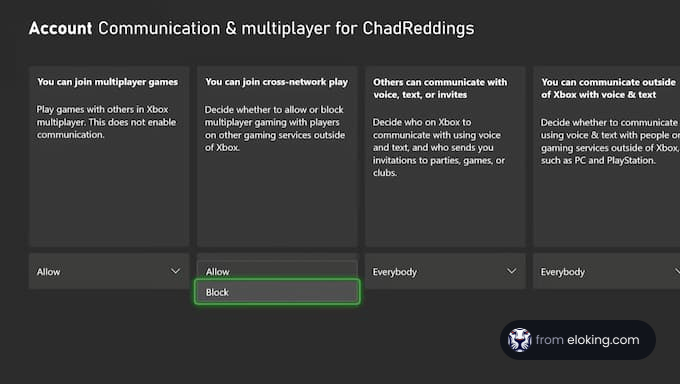
Select privacy & online safety > Xbox privacy > view details and customize > communication & multiplayer.
Find the setting that says “you can play with people outside of Xbox Live” and choose the “block” option.
On PlayStation 4 and PlayStation 5:
Launch Overwatch 2.
Go to the options menu
Select gameplay > general > cross-platform play
Turn the setting off.
Why would players want to disable crossplay in Overwatch 2?
Although crossplay appeals to many players, others prefer to disable it. The main reason is the perceived unfair advantage that PC gamers using KBM have over console gamers using a controller, which can make some players feel like they’re at an automatic disadvantage.
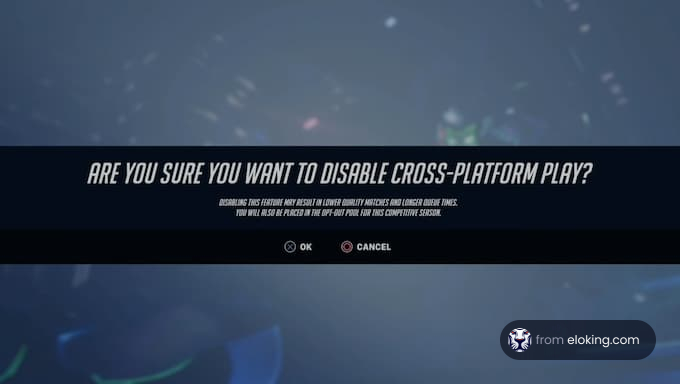
Although Blizzard has measures in place, some players may still want to opt out. It’s essential to know that disabling crossplay can increase queue times, as players will be limited to the pool of players from their platform who also opted out.
FAQs
Crossplay in Overwatch 2 allows players across PC, Xbox, PlayStation, and Nintendo Switch to play together in most game modes. Competitive mode separates players into input-based pools.
Link your console account to your Battle.net account via the Battle.net website, then merge the accounts through the in-game prompt using the QR code or link provided on your console.
All progress is saved to your Battle.net account. Linking your account across platforms syncs cosmetics, achievements, and other unlocks, so your progress carries over.
PC players cannot disable crossplay. Console players can disable it via their Xbox privacy settings or within Overwatch 2's gameplay options in the settings menu.
What’s next?
Ready to level up your gameplay and climb the ranks in Overwatch 2? Purchase our top-notch Eloking Overwatch 2 Boost now and dominate the competition like never before!
Purchase Overwatch 2 Boost
and start playing at the rank you deserve!

















 Quality
