Streamlined three-tier loyalty program where every member enjoys the same high-quality rewards, with benefits escalating at each tier.
Simple yet effective, this program stands as the best deal for Eloking's boosting services, ensuring maximum value and satisfaction for all our users.
Cashback on all Eloking boosts (3%, 5%, 7%)
Discounts for all Eloking boosts (5%, 10%, 15%)
Discount for a friend 🤗
Free daily lootbox spin with industry-leading rewards
Member exclusive season and event offers
How to track your playtime in League of Legends
h
Hamza Rashid
Gamer
03 Feb 2026
Updated On
League of Legends has been around for well over a decade, and multiple players have been playing on and off for years. With every match averaging around 40 minutes, it’s only natural that players could rack up tons of hours without realizing it, especially since Riot Games doesn’t have an official way for players to see how much time they’ve spent on the game.
Fortunately, that doesn’t mean players can’t track their playing time through other methods. These methods include requesting official information about your account from Riot Games, and choosing third-party applications and websites like Wasted on LoL, WastedTime, and LeagueOfGraphs.
So, if you’re interested in learning how much time you’ve spent in League of Legends, keep reading bevcause we have you covered. Of course, if you feel like your rank should be higher compared to the time you’ve spent on the game, then we recommend you have a professional League of Legends coach from Eloking show you the ropes to ensure your gameplay goes up.
Breakdown of your League of Legends gameplay hours
Before we show you how to check your playtime in League of Legends, you should know a few things to avoid confusion. While Riot’s official data report is accurate, if you plan on using any third-party sites to track your time, it’s important to note that these sites only provide approximate estimates. They rely on average match durations, which can vary significantly. Because of this, you shouldn’t expect to find precise playtime from match history alone.
Struggling to win? Bad teammates?
Purchase a game with one of our PRO players.
One game
Average wait time <30 minutes
$4.00
$3.32 per game
Two games
Average wait time <30 minutes
$8.00
$3.00 per game
Three games
Average wait time <30 minutes
$12.00
$2.50 per game
How to track your time spent on League of Legends
With everything else out of the way, it's time to go through every reliable method you should use if you want to see how much time you've spent or wasted in League of Legends.
Official Riot Games Data Report
If you’re looking for the most accurate and official information about your League of Legends account, you can request a full data report directly from Riot Games [2]. This report includes the total matches played, champion usage, and login history. To order this data, head to Riot’s official Privacy Portal, log in with your Riot account, and click “Request your Data”. Once your request is submitted, a download link will be sent to your email. But remember that the report can take 30 days to be ready, so it’s not an instant process.
However, since the report can take up to 30 days to arrive, it’s not ideal if you’re just curious and want quick answers. Because of this delay, many players turn to third-party tools for faster, though less accurate, results.
Wasted on LoL (wol.gg)
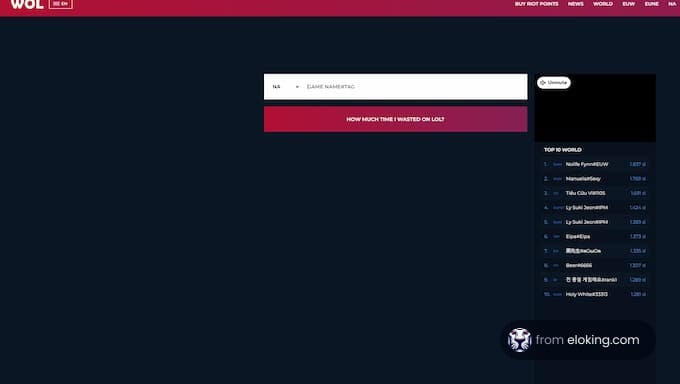
Wasted on LoL [1] is one of the most popular and trusted third-party sites for estimating total playtime in League of Legends. It’s easy to use and doesn’t require your Riot login, making it a quick and safe option for curious players.
Using Wasted on LoL is quite straightforward. All you need to do is go to their website, wol.gg, type in your Summoner Name exactly as it appears in the game, choose your region, and click “Search” or “How much time I wasted on LoL”. The site pulls data about your match history from Riot Games and uses an average game length to estimate your total playtime. The results are shown in minutes, hours, and days, along with the number of games played.
WastedTime.io
WastedTime.io [3] works similarly to Wasted on LoL. You type in your Riot ID, and the site provides data on how much time you’ve spent on League of Legends. It also gives a more detailed breakdown of time spent in various game modes, such as ARAM and normal games. Furthermore, it also allows for more precise tracking of hours over the past year. While it provides a rough estimate of total hours, its strength lies in analyzing recent gameplay.
LeagueOfGraphs
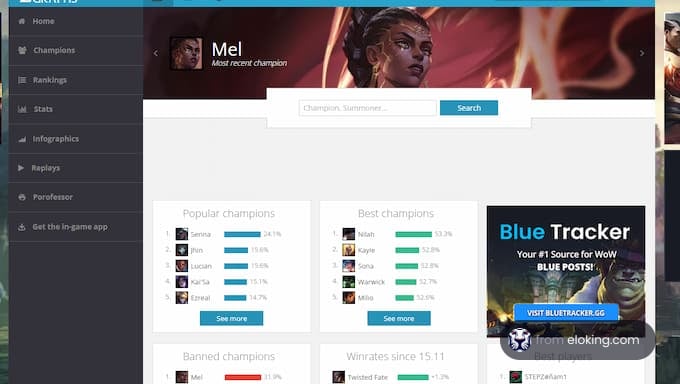
Like WastedTime.io, League of Graphs [4] offers a broader set of stats. All you need to do is go to LeagueOfGraphs.com and enter your Riot Games ID. Then you’ll get detailed information about your account, including playtime by game mode and overall stats across different seasons. It’s a great tool for spotting gameplay trends and tracking your performance over time.
You can request an official data report from Riot Games through their Privacy Portal, or use third-party websites like Wasted on LoL, WastedTime.io, or LeagueOfGraphs for estimates.
Third-party trackers like Wasted on LoL provide estimates based on average match durations, so they may not be as accurate as the official data from Riot Games.
Requesting your data report from Riot Games can take up to 30 days. It's not instant, which is why many players use third-party sites for quicker estimates.
The official Riot Games data report includes total matches played, champion usage, and login history for your League of Legends account.
A standard game lasts 25-35 minutes, but can vary. Factors like team composition, surrender votes, and early objectives can influence game length.
























 Quality
