Streamlined three-tier loyalty program where every member enjoys the same high-quality rewards, with benefits escalating at each tier.
Simple yet effective, this program stands as the best deal for Eloking's boosting services, ensuring maximum value and satisfaction for all our users.
Cashback on all Eloking boosts (3%, 5%, 7%)
Discounts for all Eloking boosts (5%, 10%, 15%)
Discount for a friend 🤗
Free daily lootbox spin with industry-leading rewards
Member exclusive season and event offers
Can't find match in League of Legends (Fixed)
s
Sharik Shaikh
Gamer
03 Feb 2026
Updated On
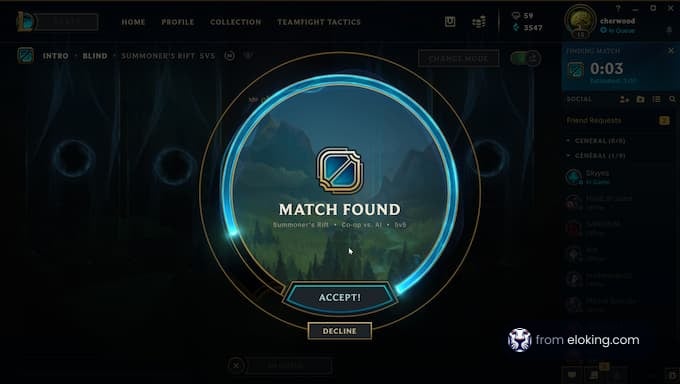
The competitive nature of League of Legends [1] is arguably one of the biggest reasons it’s still so relevant. Players worldwide hop into the game, whether alone or with friends, to see how much they can win. It’s because of this specific gameplay loop that players can find themselves lost and confused when they just can’t find a match, no matter how hard they try.
Today, we’re here to go through everything players need to know about why they can’t find a match in League of Legends. These are all either fixes or reasons for your predicament, and by the end, you should be able to easily find a League of Legends match to jump into the rift and aim for victory.
So, if you want to play some League of Legends but can’t find a match for some reason, we have you covered with some reasons. Of course, if the reason is that your rank doesn’t have many players, then the best way would be to reach a rank that’s more competitive. For example, most players find themselves in Gold or Emerald, which is where players usually play ranked more, while lower-ranked players prefer playing casual modes.
Why are there long queue times in League of Legends?
One of the most annoying issues in League of Legends is that players experience long queue times or can’t find a match. Gamers can experience this issue due to numerous factors, such as server issues, player behavior, or even the time of day.
Some temporary game modes, like Arena, have longer queues due to a small player count. However, if queue times are unusually long or the system fails to find a match, players might need to troubleshoot the issue.
It’s important to keep in mind that the rank you’re playing in plays a huge role in how long it takes to find a match. While casual modes like unrated usually gives you matches fast, ranked mode can take a while, especially if there’s a rank disparity or your rank doesn’t have a large pool of players playing at that time. Sometimes, it may be a good idea to just play a different mode until there are enough players for the mode you want to play. While there are likely players in line with you, it wouldn’t be fair if Silver players were matched against Diamonds.
Struggling to win? Bad teammates?
Purchase a game with one of our PRO players.
One game
Average wait time <30 minutes
$4.00
$3.32 per game
Two games
Average wait time <30 minutes
$8.00
$3.00 per game
Three games
Average wait time <30 minutes
$12.00
$2.50 per game
What to do if I can’t find a match in League of Legends?
If the issue isn’t with the long queue times but you still can’t find a match in League of Legends for some reason in any game mode, then we recommend you consider trying the following troubleshooting methods.
Check server status
Before making changes, players should verify whether Riot’s servers [2] are working. Server outages or maintenance can prevent matchmaking from working correctly. Users can check websites like Riot’s Service Status page or third-party platforms like Downdetector to confirm if other players are experiencing similar issues. If the servers are down or having issues, the only solution is to wait until Riot fixes the problem.
Change server region
Players in less populated regions can struggle with long queue times due to fewer active players. Switching to a more active server, like North America or Europe West, can reduce wait times. However, changing it requires a region transfer, which can cost RP or have account restrictions. Before paying for a region transfer, players can create a new account on a different server to check if they can find games and are fine with the ping.
Peak hours
Queue times can depend on when players attempt to queue. Playing during off-hours, such as early mornings or weekdays, can result in longer queues because fewer players are online. Peak hours, usually evenings and weekends, can provide faster matchmaking. Gamers should adjust playtimes to align with periods of more activity.
Disable VPN or proxy services
VPN or proxy can interfere with League of Legends’ matchmaking systems. Riot’s servers may flag players’ connections as unstable, leading to longer queue times or failed matchmaking attempts. Disabling VPNs before launching the game can resolve this issue.
Verify internet connection
A poor or unstable internet connection can disrupt matchmaking. Players should ensure their network is stable by running a speed test or checking for packet loss. If the connection is weak, restarting the router or modem can help. Users should try to use Ethernet over Wi-Fi for its reliability and stability. Also, closing bandwidth-heavy applications like streaming services can improve connectivity.
Try a different game mode
Some game modes, especially rotating ones, have longer queue times due to a lower player count. Switching to popular modes like Summoner’s Rift (Ranked or normal Draft) or ARAM can speed up matchmaking. Queueing for Ranked Flex with anything other than a 5-stack can cause long wait times, so players should go for Solo/Duo or play normal Draft.
Repair the game client
Corrupted game files can cause matchmaking issues. Players can repair the game by going to the Riot client’s settings, selecting the League of Legends tab, and clicking the Repair button. The client will begin to scan the game and fix files if anything is corrupted.
Reinstall League of Legends
If repairing the game doesn’t work, players may need to reinstall League of Legends. Uninstalling and reinstalling the game ensures all files are not corrupted. Players should delete all the residue files from the game’s directory after uninstalling.
Restarting
A simple fix a player can do is restart the game client, Riot client, or the computer. Background processes or glitches can interfere with matchmaking, where a fresh start can often resolve them.
Check for shadowbans or restrictions
In some cases, players might experience longer queues due to behavioral restrictions or shadowbans. If a player has been reported frequently or has left too many games, the system may put them in a low-priority queue. Players can contact Riot support to check their account’s standing.
Contact Riot Support
The only option left is to contact Riot Support if everything fails. Consistent matchmaking issues could indicate account-specific problems that only the company can fix. Players can contact Riot’s support team by going to their website.
Long queue times can be due to server issues, your behavior score, or the time of day. Less popular game modes or playing during off-peak hours can also increase wait times.
Check Riot's Service Status page or third-party sites like Downdetector. If servers are down, you'll have to wait for Riot to resolve the issue before matchmaking works.
Yes, VPNs or proxy services can interfere with matchmaking. Try disabling them as Riot's servers might flag your connection as unstable, leading to longer queue times.
Make sure Riot's servers are online, and that your internet connection is stable. Also, make sure you are playing during peak hours for your region. Try playing a more popular game mode if queues are too long.


























 Quality
