Streamlined three-tier loyalty program where every member enjoys the same high-quality rewards, with benefits escalating at each tier.
Simple yet effective, this program stands as the best deal for Eloking's boosting services, ensuring maximum value and satisfaction for all our users.
Cashback on all Eloking boosts (3%, 5%, 7%)
Discounts for all Eloking boosts (5%, 10%, 15%)
Discount for a friend 🤗
Free daily lootbox spin with industry-leading rewards
Member exclusive season and event offers
How important is ping in Dota 2?
h
Hamza Rashid
Gamer
03 Feb 2026
Updated On
Online games are a dime a dozen now, thanks to the worldwide adoption of the internet. Whether they’re co-op games where friends can join forces to tackle some computer-generated enemies, or multiplayer games, where players face off against each other, it’s crucial to have a proper connection and ping.
Dota 2 is no different in this regard, since the game also requires players to have a good ping. In addition to knowing how ping works in the game, it’s also crucial to know how you can check the ping in Dota 2, whether through the in-game settings or command prompt. It’s also a good idea to know what a good ping to have is.
Without any further delays, if you’ve found yourself lagging and stuttering when playing Dota 2, then you may have to educate yourself on how ping works.
How does ping work in Dota 2?
Every millisecond matters in a fast-paced game like Dota 2. That’s where ping comes in, which measures the time taken to send data to the game server and receive a response. Ping is measured in milliseconds (ms), and the lower it is, the smoother your game feels.
If you have ever cast a spell that fired off a moment too late, that is high ping. A steady ping means almost an instant reaction, while a high ping usually leads to delays, missed skills, or awkward team fights. Sudden jumps or spikes in ping can be just as frustrating, even if it seems mostly stable.
But ping isn't the only thing to watch; packet loss is equally important. It happens when bits of your data fail to reach the server at all, and it's just as bad, if not worse. Even if your ping is low and stable, packet loss still causes stutters, rubberbanding, or abilities failing to register. And if your ping also spikes, the game quickly turns chaotic.
Knowing how to monitor your ping and packet loss in Dota 2 helps narrow down whether the issue is your internet, settings, or the server.
Struggling to win? Bad teammates?
Get a guaranteed win with a 7000+ MMR pro - starts in under 30 minutes.
One game
Average wait time <30 minutes
$4.00
$3.32 per game
Two games
Average wait time <30 minutes
$8.00
$3.00 per game
Three games
Average wait time <30 minutes
$12.00
$2.50 per game
How to check ping in Dota 2?
Thankfully, monitoring your connection in Dota 2 is straightforward. There are two main ways to do it: either the quick in-game display, which shows your live ping and packet loss while you play, or Command Prompt (CMD), which lets you test your connection to different servers before queuing.
Checking ping in-game
This is the easiest option and perfect for keeping an eye on your connection while playing:
Open Dota 2.
Click the gear icon in the top-left to open Settings.
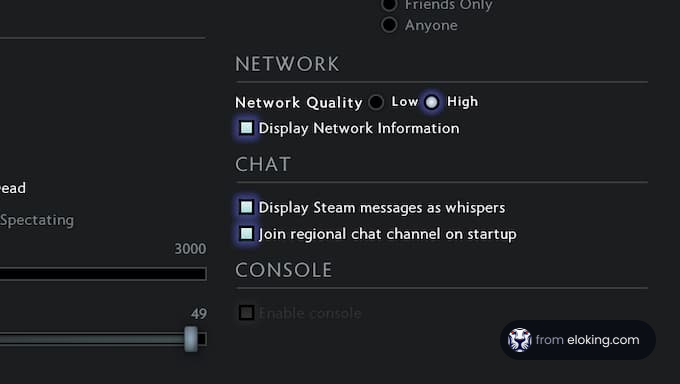
Go to Options > Advanced Options.
Under Miscellaneous, tick the box for Display Network Information.
Once that’s on, you’ll see your ping, FPS, and packet loss in the top-right corner while you play. That way, you can quickly tell whether your connection is stable or something’s acting up.
Checking ping with Command Prompt (CMD)
CMD takes a little more technical know-how, but it’s super useful for testing your connection to a specific server before you hop into a game, especially competitive:
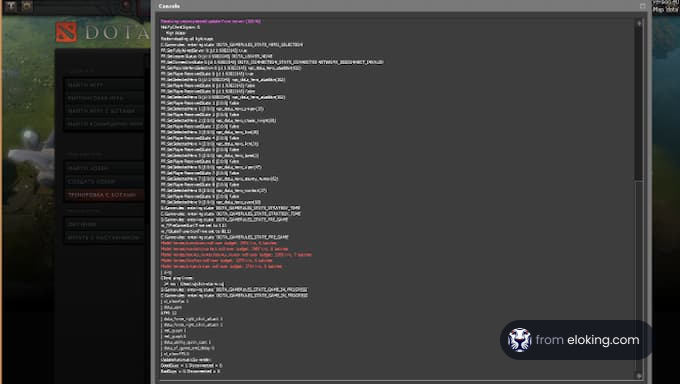
Press Windows + R, type cmd, and hit enter.
In the window that pops up, type:
“ping [server IP or URL]” (example: ping sgp-1.valve.net for Singapore).
Check the results, and you will see your average ping in ms and whether any packets were dropped along the way.
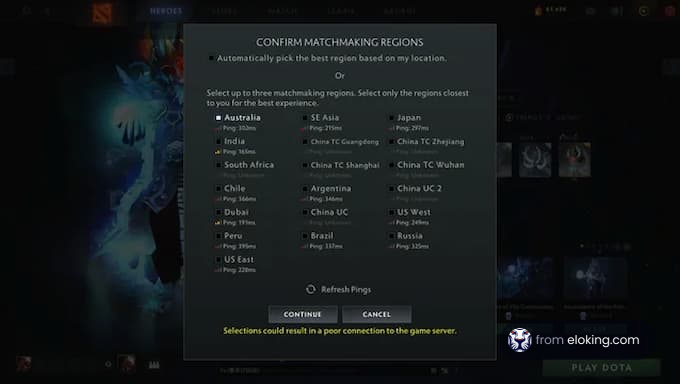
You can use this method to decide which server region to play on. A quick check can save you from queuing for a match where lag might ruin the experience.
What’s a good ping in Dota 2?
You think of ping in Dota 2 in simple ranges:
0–50ms: Great. Ideal if you’re aiming to play competitively.
50–100ms: Still playable, though you might feel tiny delays in tense moments.
100ms+: Tricky. Delays start to accumulate and can make the game unplayable at times.
You should troubleshoot the issue if your ping consistently sits over 100ms. Try switching servers, closing background apps, and switching to a wired connection instead of Wi-Fi. Since every move in Dota 2 comes down to timing, keeping your ping low can turn close calls into clutch plays.
FAQs
Enable 'Display Network Information' in Options > Advanced Options. This shows your ping, FPS, and packet loss in the top-right corner of the screen while you play.
Ideally, aim for 0-50ms for competitive play. 50-100ms is still playable, but you might notice delays. Over 100ms can make the game difficult due to noticeable lag.
Use Command Prompt (cmd) and type "ping [server IP or URL]" (e.g., ping sgp-1.valve.net). This shows your average ping to that server, helping you choose the best region.
High ping, which is the time it takes for data to travel to and from the server, causes delays. Packet loss, where data fails to reach the server, also leads to stuttering and missed actions.
Consider packet loss. Even with low ping, packet loss causes stutters and abilities not registering. Check for packet loss alongside your ping to diagnose connection issues.
What’s next?
Now that you have learned something new about Dota 2 - it’s time you start playing and get better at the game. We can help!
Purchase Eloking Dota 2 Boost right now
and start playing at the rank you deserve!























 Quality
